Scrumboard - A Jira-Ersatz to Teach Agile Software Development
Over the past few years, we’ve been developing a web-based tool to support students tracking their progress in an agile software development course. In this blog, I’ll explain why we moved away from professional / industry-grade tools and decided to (not) reinvent the wheel.
Issues with commercial or professional tools
Following up from a prior experience with Jira while teaching in Belgium, I tried to use it again in that larger-scale SENG302 course. While it looked like a great idea at first for its relevance to industry, and data tracking, we abandoned after one year for the following reasons:
- the first-time setup of permissions, tuning of views, and reports is highly complex; they took a while to get right so that students had sufficient rights to record their work and progress, but not delete their (historical) mistakes for marking, feedback and reflection purpose;
- the overhead to create dedicated projects at the start of the year was non-negligible;
- the extraction of data for automated analysis purposes (e.g., logged time, type of work) could only be done via API calls that were complex and rather slow using the cloud version;
- the inability to add education specific features easily (e.g., reflection or feedback forms);
- the performance of the cloud version was sub-par when we had 70+ students in 10 teams (projects) using the tools in burst within the same time frame;
- and last, the recurring license cost was non-negligible.
So, we decided to implement a similar, yet tailored tool, called the ScrumBoard. If you are interested in the latest version of the tool, please reach out as currently, this gitlab repository is a bit outdated.
Less configurability, but more features for education
Some disclaimer first
The ScrumBoard, as its name indicates, is tailored for the Scrum process, so it does not offer the flexibility of other commercial tools that allow to define Kanban boards, for example. This was a conscious decision to speed up the development of the first version over a summer break with only a few interns. Also, the course uses Scrum as this framework suits our educational goals well: strict cycles with some planning and somewhat structured requirement engineering, regular reflection, cross-functionality (for students to increase their breadth of skills).
Funnily enough, it was developed following a looser, more Kanban-y approach.
Walkthrough of main features
Backlog and sprint management
The first set of features relate to product backlog management and sprint management. You can create stories, add acceptance criteria (i.e. Behaviour-Driven Development scenario), and create tasks associated to each story. We do not provide a way to create epics though.
When you have moved some stories from your product backlog to the sprint backlog, and set up the start and end dates of the sprint, you can start the sprint and access a sprint board, as shown below.
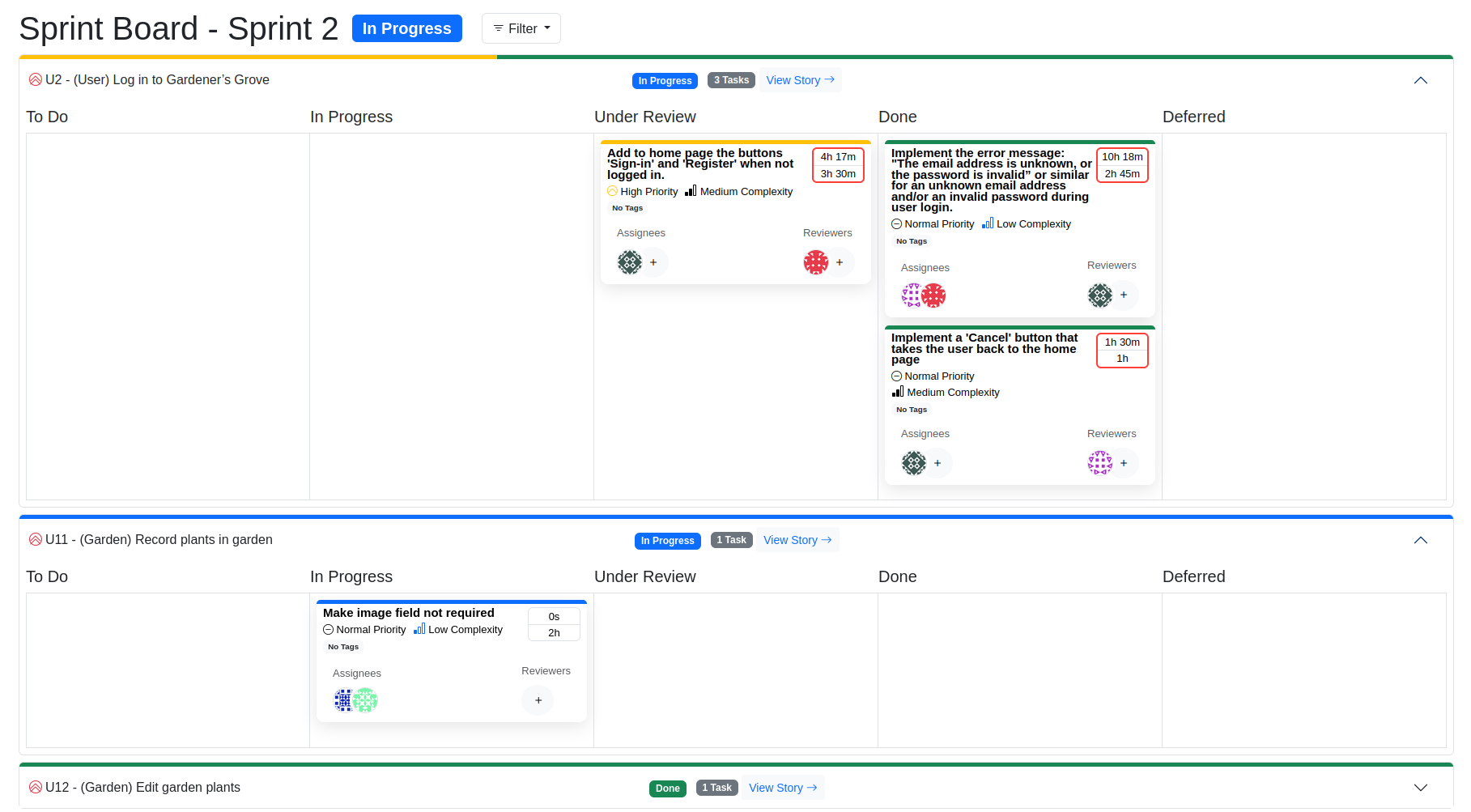
The tool offers all typical work tracking features such as tasks progress, time logging, and linking git commits. Optionally, developers can attach additional information such as work-log tagging if they want to track the type of work in a fined-grained way, e.g., feature work, testing, chore work. This is particularly useful when training full-stack developers.
Sprint review
A specific feature that we could not find in any existing tool is the ability to perform sprint reviews in a traceable and structured way. Since the ScrumBoard allows adding structured acceptance criteria in dedicated fields, we can offer a dedicated UI to record sprint (product) reviews, as depicted below.

A reviewer will be able to systematically go through all acceptance criteria, specifying whether they pass or fail, and add some comments for bug reproduction purposes.
Personal progress tracking
While developers (i.e. students) are working on their tasks, they can access to a personal progress tracking. This is particularly important in our context, as we want students to work on all aspects of software development, including different types of activities (e.g., feature development, testing, chore work, documentation), as well as working across the code base (i.e. stories). We also want students to learn to work in pairs, following well-known agile software development practices. Below visualisation shows a summary of a student key progress indicators. Note that this view is under improvement and will change in the near future.
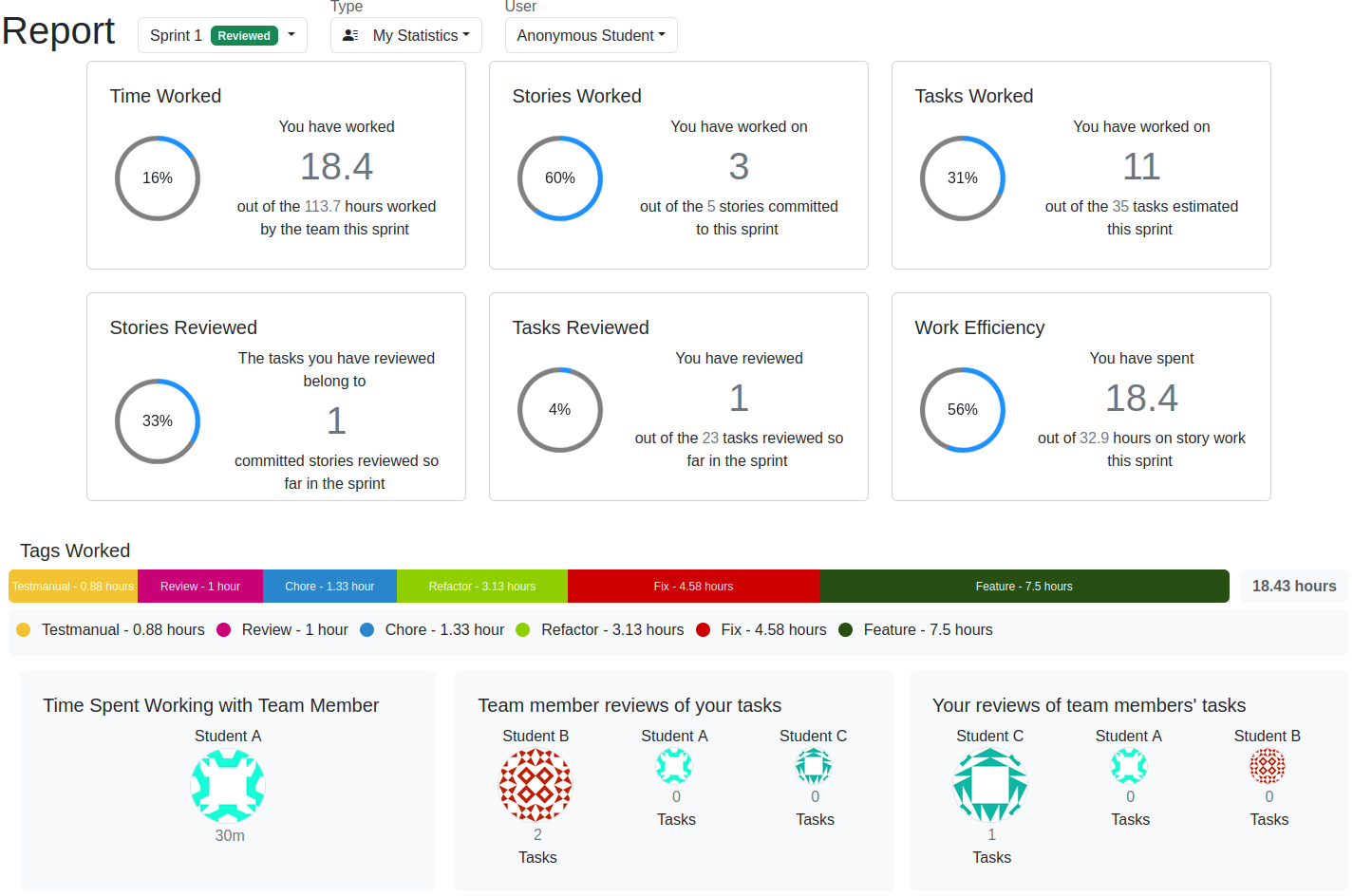
Note that we offer additional visualisations about hours put into the project over weeks with a breakdown per work-log type.
Marking support
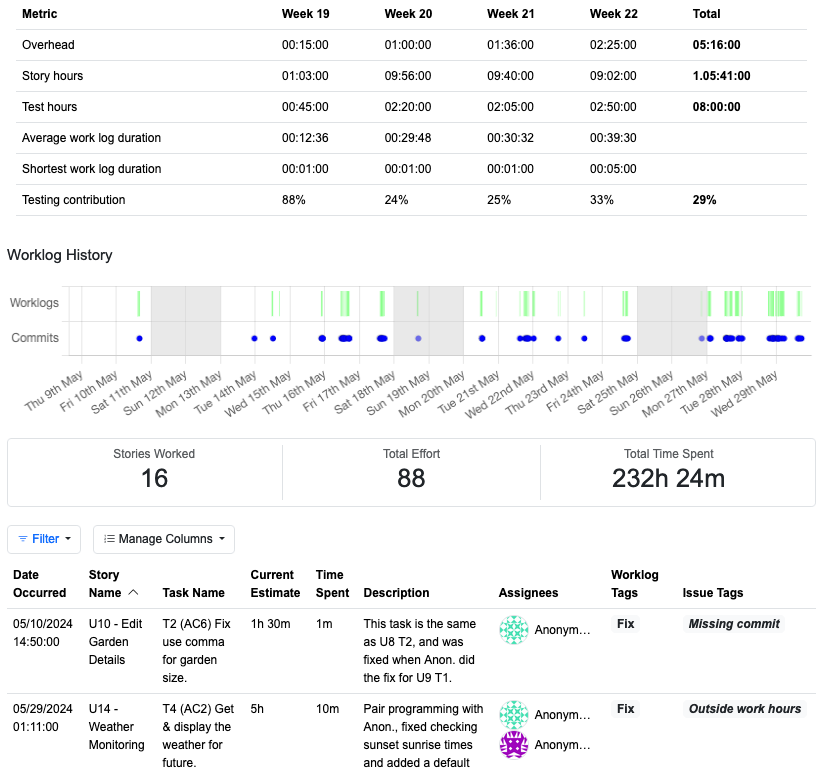
Last, we offer a summary for markers where we can identify potential issues in work patterns, or lack of evidence from students claiming work. Among other metrics, we can see how much a student worked per week, broken down between formal sessions (denoted by “overhead” below), feature work and testing. We can also see a punchcard of code commits and work-logs. Finally, we can see a list of work-logs of interest that either are missing linked git commits, or have been made outside typical work hours (for worklife balance monitoring), for example.